How to subscribe a user to an AWeber list when the user registers in the vBulletin forum automatically. Step by step Guide.
I am using both of them for quite some time now, and finally, let me integrate both. I know AWeber forms are great, but if you can have it integrated with your existing vBulletin registration system, that is even greater.
So let’s get started.
AWeber does not provide any API to integrate the registration process of vBulletin, but what they offer is custom email parsers. An email parser allows you to integrate your user such that when a user registers at your site, you can email Aweber to add it to your list.
If you can email AWeber about the details of your user who just registered at your vBulletin forum and have a custom parser enabled, which can parse the content of the email to extract the needed fields Aweber can add the user to the campaign.
It’s a three-step process
Step 1: Edit vBulletin Email Body Text Phrase
The first step to integrating AWeber with vBulletin is to edit the outgoing email phrase text in vBulletin.
Go to Admin CP > Languages & Phrases > Email Body Text Phrase Type.
Edit newuser from
There is a new user, $username at $vboptions[bbtitle]

To view their profile, go here:

$vboptions[bburl]/member.php?u=$userid

Email Address : $email
Birthday : $birthday
Referrer: $referrer
IP Address: $ipaddress

$customfields
To
There is a new user, $username at $vboptions[bbtitle]

To view their profile, go here:

$vboptions[bburl]/member.php?u=$userid

Username : $username
EmailAddress : $email
Birthday : $birthday
Referrer: $referrer
IP Address: $ipaddress

$customfields
Summary of changes
- Add the following line
Username : $username
- Edit the following line from
Email Address : $email
to
EmailAddress : $email

Step 2: Setup AWeber Parser
We now need to create a parser in Aweber to parse the data sent from the forum. Setup a Custom Parser in Aweber.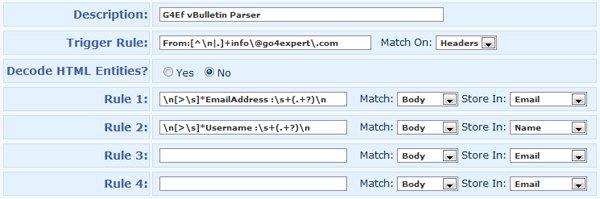
- Trigger rule should be your webmasters from the address in your vBulletin, and this is tested in Headers.
From:[^\n|.]+SomeName\@domain\.com
- Rule 1 to get an email address from the sent email headers.
\n[>\s]*EmailAddress :\s+(.+?)\n
- Rule 2 to get the username of vBulletin as the name in Aweber.
\n[>\s]*Username :\s+(.+?)\n
I prefer to have a vBulletin username as the name in Aweber, but you can have other Custom Fields in your vBulletin and parse them from the emails to add them to Aweber.
Step 3: Change Your Email Settings to Notify AWeber
New user Registration notification should be sent to YourList@aweber.com
Admin CP > vBulletin Options > vBulletin Options > User Registration Options > Email Address to Notify About New Members
And add YourList@aweber.com.
All done.
Final Thoughts
Integrating AWeber with vBulletin using Email parser one limitation, which is double email confirmation. However, you can disable email confirmation in the AWeber list as we add the user only when they have confirmed in the forum.
Also, check out the AWeber integration with Joomla.